← Previously: Star Schema Done Right, Part 2: Dimension Tables and Why Cardinality Matters (11 Jun) → Next: Part 4: Migrating a Flat Table to a Star Schema in Power BI (25 Jun)
What this post covers: why "the customer changed" is a modelling decision and not a data-entry one; the difference between overwriting an attribute (Type 1) and versioning it (Type 2), and why that choice belongs to the question, not the column; the surrogate key that every tutorial skips and without which Type 2 is impossible; and how point-in-time and as-it-is-now reporting both fall out of the model once the key is right.
The scenario, because the abstract version teaches you nothing
A customer in your sales model, customer 1247, lived in NSW on a Silver tier when they placed their first order in 2023. Last month they moved to Queensland and spent enough to bump up to Gold. Same business, same person, three attributes that used to be true and now aren't.
Now two people open two reports. The account manager pulls "revenue by region" to plan this quarter's travel, and wants 1247's entire history sitting under Queensland, because that's where they are and that's where she's flying. The finance analyst pulls "2023 revenue by region" to reconcile against a board pack that was signed off eighteen months ago, and needs every one of those 2023 orders to stay in NSW, because that's where they were booked and the board pack is not going to change.
Both reports are correct. They disagree about customer 1247 by design. The flat table you started with cannot satisfy both, because it has exactly one Region cell for 1247 and it holds exactly one value. This is the problem slowly changing dimensions exist to solve, and the reason most tutorials wave at it and move on is that the honest answer starts with "it depends on the question," which is the answer every reader's patience forbids unless you immediately say what it depends on. So: it depends on whether the report is asking where is this customer or where was this customer when it happened. Hold those two questions in your head. Everything below is machinery for answering them separately.
Type 1 is an overwrite, and overwrites have no memory
The simplest response to "the customer moved" is to change the cell. 1247's Region was NSW, now it's Queensland, you update the dimension row, done. This is a Type 1 slowly changing dimension, and the name oversells it: there's no slow change, there's a destroyed old value and a new one in its place.
Type 1 answers the account manager's question perfectly. Every order 1247 ever placed now resolves to Queensland, because the dimension has one row for 1247 and that row says Queensland, and Part 2's whole argument means the fact table's fifty thousand order rows all inherit it through the relationship the moment you refresh. "Revenue by region" reflects the world as it is right now, which is exactly what an as-is-now report should do.
It also silently rewrites history, and that's not a bug, it's the entire behaviour. The finance analyst's 2023 reconciliation now puts those NSW orders under Queensland, disagreeing with a signed board pack, and there is nothing in the model that even remembers NSW was ever the answer. Type 1 is the right call for attributes where history is genuinely irrelevant - a corrected spelling of a customer's name, a fixed typo in a product description, an email address. Nobody reconciles last year's numbers against an old email address. Use Type 1 when the old value was wrong or when nobody will ever ask what it used to be. The instant somebody might, you've outgrown it.
Type 2 keeps the history by keeping more rows
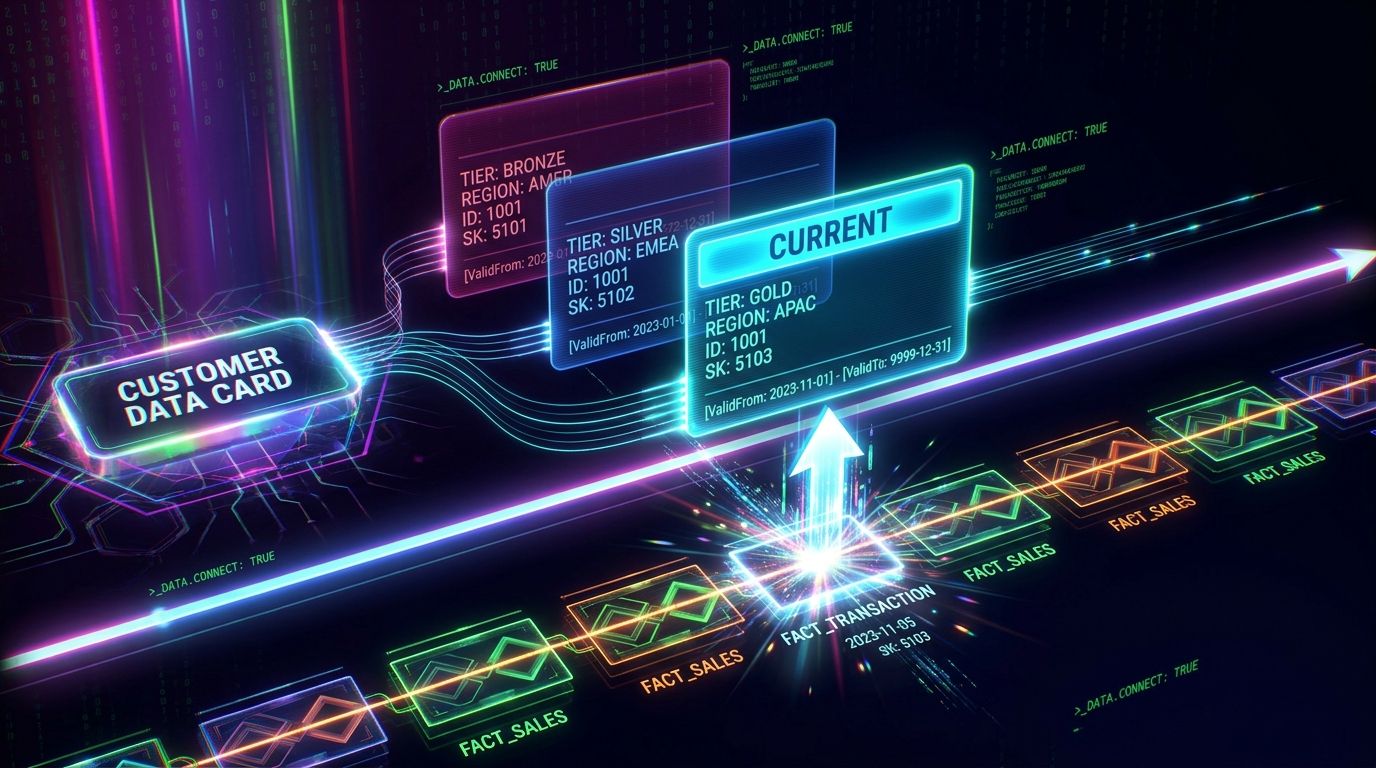
If you need the old value to survive, you stop overwriting and start adding. A Type 2 dimension stores a new row every time a tracked attribute changes, so customer 1247 stops being one row and becomes a small stack of them: one for the NSW/Silver era, one for the Queensland/Gold era, and another every time something tracked changes again.
The shape looks like this:
CustomerSK  CustomerID  Name        Region      Tier    ValidFrom    ValidTo      IsCurrent
---------------------------------------------------------------------------------------------
5101        1247        Acme Pty    NSW         Silver  2023-01-01   2026-05-19   FALSE
5102        1247        Acme Pty    QLD         Gold    2026-05-20   9999-12-31   TRUE
Two rows, same business. Read the columns and the design explains itself. CustomerID is the natural key, the identifier the source system knows the customer by, and it is no longer unique in this table. ValidFrom and ValidTo bound the window each version was true for. IsCurrent flags the live one. And CustomerSK - the surrogate key - is the new unique key, a meaningless integer the warehouse mints, one per version rather than one per customer.
That surrogate key is the part nobody explains, so here it is plainly: the fact table must store the surrogate key, not the natural key. When 1247 placed a 2023 order, the load process looked up which version of 1247 was current on the order date - row 5101, the NSW one - and wrote 5101 into the fact table. The May 2026 order got 5102. The fact table no longer says "this order belongs to customer 1247," it says "this order belongs to the version of 1247 that was current when it happened," and that single indirection is what lets one model answer both questions.
If your fact table stores CustomerID, you do not have a Type 2 dimension. You have a Type 2 dimension table sitting next to a fact table that can't use it, because CustomerID matches both rows and the engine has no way to know which version any given order belonged to. This is the most common way SCD goes wrong, and it goes wrong quietly: the dimension looks sophisticated, the history is all there, and every number is still computed against whichever version the relationship happens to grab. The surrogate key on the fact is not an implementation detail. It is the feature.
What this does to the relationship, and why it's still legal
Part 2 spent a thousand words on the contract: the dimension side of the relationship must be unique, fact-to-dimension is many-to-one, filters flow from the one side to the many. A Type 2 dimension has multiple rows per customer, which sounds like it shatters that contract, and it would if you related on CustomerID. You don't. You relate on CustomerSK, which is unique - one row per version, each surrogate appearing exactly once - so the relationship is still a clean one-to-many and everything Part 2 promised still holds. The business key demotes to an ordinary, non-unique attribute column, useful for grouping, useless for relating.
This is also the honest resolution of Part 2's "customer per year" warning. A table with one row per customer per year, relating on the customer's natural key, was an accidental many-to-many that broke totals. The same table, relating on a surrogate key with the year baked into a validity window, is a correct Type 2 dimension. The difference between a data quality disaster and a textbook pattern is entirely which key the fact table points at.
Point-in-time reporting now requires no DAX at all. The finance analyst slices 2023, the fact rows from 2023 carry surrogate 5101, 5101 resolves to the NSW row, and revenue lands in NSW. The model does it through the relationship, exactly as a good model should. Total Revenue = SUM ( FactSales[Revenue] ) is still one line and still correct, because the surrogate key did the historical attribution at load time and the report just inherits it.
Getting the "current" view back out of a Type 2 dimension
The catch is the account manager. Her as-is-now report was free under Type 1 and is now the hard one, because 1247's 2023 orders correctly resolve to NSW and she wants them under Queensland. The history you carefully preserved is in her way.
There are two clean answers and one mess. The mess is bidirectional filtering or convoluted DAX gymnastics to chase the current row, which Part 2 already warned you off. Don't.
The first clean answer is the IsCurrent flag, for reports that are only ever current:
Current-Customer Revenue =
CALCULATE (
    [Total Revenue],
    FactSales[CustomerSK] IN VALUES ( DimCustomer[CustomerSK] ),
    DimCustomer[IsCurrent] = TRUE
)
That only counts revenue tied to current versions, which is not what the account manager wants either - she wants all of 1247's revenue, attributed to where they are now. Which points at the second and better answer: carry a current attribute alongside the historical one. Add a RegionCurrent column to every version row of the dimension, always holding the customer's present region regardless of which era the row represents:
CustomerSK  CustomerID  Region (point-in-time)  RegionCurrent
-----------------------------------------------------------------
5101        1247        NSW                     QLD
5102        1247        QLD                     QLD
Now Region answers "where was the customer when it happened" and RegionCurrent answers "where is the customer now," from the same dimension, with no extra relationships and no measure cleverness. The account manager builds her visual on RegionCurrent, the finance analyst builds hers on Region, and they stop disagreeing because the model finally lets them ask different questions out loud. Combining versioning and a current-value column like this is sometimes filed under "Type 6," or "Type 1 + 2 + 3," and the number matters far less than the recognition that which behaviour you want is a property of the report, not a fixed trait you stamp on the column once and live with.
Where this trips people up
A slicer shows the same customer three times. Because the dimension genuinely has three rows for them, and you built the slicer on a column that varies across versions. Build customer slicers on a current attribute, or filter the slicer to IsCurrent = TRUE, so the user picks the customer once and the model still resolves the right version per fact row underneath.
Distinct customer counts come out too high. DISTINCTCOUNT ( DimCustomer[CustomerSK] ) counts versions, not customers, so a customer who moved twice counts as three. Count the business key instead: DISTINCTCOUNT ( DimCustomer[CustomerID] ). This is the one place the natural key earns its keep.
The open record's ValidTo is blank. Leave the current version's ValidTo empty and any ValidFrom <= date && date <= ValidTo logic silently drops every current row, because a comparison against blank fails. Use a sentinel far-future date - 9999-12-31 is the convention - so the current version has a real upper bound the engine can compare against. It's the same lesson as the date table needing future rows: the boundary has to exist even when it feels like it doesn't.
Frequently Asked Questions
Do I decide Type 1 versus Type 2 per dimension or per column?
Per column, and that's the framing most tutorials get wrong. A single customer dimension routinely mixes them: track region and tier as Type 2 because history matters for reconciliation, overwrite a corrected company name as Type 1 because nobody reconciles against an old typo. The dimension is Type 2 the moment any tracked column needs history; the other columns just come along for the ride.
Where should I build the SCD logic - Power Query, the source, or DAX?
Upstream of the model, always. A proper warehouse handles versioning in the ETL layer or the source database, where the surrogate keys are minted and the validity windows are maintained on load. Power Query can do it for smaller self-service models, with more effort and more fragility. DAX is the wrong layer entirely: it reports on the model, it shouldn't be inventing history at query time. If you find yourself reconstructing versions in a measure, the work belongs further back.
What's a surrogate key and why can't I just use the customer ID?
A surrogate key is a meaningless integer the warehouse generates, one per dimension row, with no business meaning of its own. You can't use the customer ID because in a Type 2 dimension the ID repeats across versions, so it can't uniquely identify a row, and the relationship and the historical attribution both depend on a key that does. The surrogate key exists precisely to be unique when the natural key has stopped being.
Won't all these extra rows wreck performance?
Almost never, and far less than people fear. Dimensions stay small even with versioning - a few extra rows per entity is nothing next to a fact table with millions, and the VertiPaq engine compresses dimension columns hard. You'll feel a badly modelled relationship or a bidirectional filter long before you feel a dimension that grew from 10,000 rows to 14,000. Model it correctly; the row count is not your problem.
How does this interact with the date table from the Deep End?
They're orthogonal and they cooperate. The date dimension answers "what calendar period is this," the Type 2 customer dimension answers "what was true about the customer in that period," and a fact row carries a key into each. The validity windows in the SCD are about the customer's own timeline, not the reporting calendar, so the two never collide. The date table piece is worth reading first if you haven't - point-in-time reporting leans on both being built properly.
Is there a Type 0, or types past 3?
Type 0 means "never changes" - the value is fixed at creation and the model refuses to update it, useful for things like an original signup date. Types beyond 3 (4, 6, and the hybrids) are mostly combinations and warehouse-specific implementation patterns. For a Power BI model, Type 1, Type 2, and the current-attribute hybrid cover virtually everything you'll actually need. Learn those cold before worrying about the rest.
Where the series goes from here
- Part 4 (25 Jun): Migrating a Flat Table to a Star Schema in Power BI. The hands-on payoff for the whole series: one flat table in, a fact and its dimensions out, relationships built, surrogate keys assigned, and every measure validated against the old numbers so you can prove the restructure didn't move anything it shouldn't have.
Part 4 lands 25 June.